Free tool for changing DNS settings

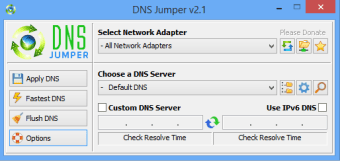
DNS Jumper is a free tool perfect for network development & IT personnel who need to make quick modifications to their Domain Name Server (DNS). This is vital for a number of purposes, from finding secure connections to accessing otherwise blocked sites. Also, maintenance teams can use it to check IP response times.

For this specialized purpose, DNS Jumper is partly similar to other DNS utility apps like namebench and NetSetMan. These apps share some similar capabilities for tweaking DNS settings but the Jumper remains the only one with its full set of features.

For specialized networking use

Despite its specialized purpose and wide range of DNS-related applications, DNS Jumper comes in a very small file size of only 546.69KB–smaller than mid-range image files or a single MP3 song. Even for people without a constant need to make changes to their DNS configurations–like casual users, students, or other non-professional users–they can keep this app without worrying much about storage space or hardware resources.

To use the app to its fullest, there is a need for technical skills and an understanding of how internet communication works. However, you can always follow forums and tutorials to perform any of the program’s specialized activities. With the right settings, you can access blocked sites, choose which server you want to connect to or set restrictions on your system to protect children from inappropriate content.

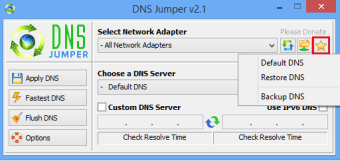
Lastly, all the settings you create or reconfigure during your session can be saved in profiles, which you can just conveniently pull up the next time you need them. Instead of providing automatically generated configurations, this app lets you build them manually, allowing you to find the best possible setup for your device. You can also clear them at once with the Flush DNS command.

Covering all bases

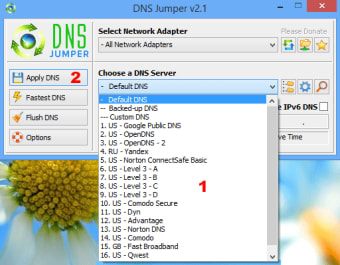
One of the most common uses of this app is to let you choose the best network connection. Typically, the Internet Service Provider (ISP) automatically routes you to the best path available, connecting your device to the optimal server at a given time. However, with this app, you can manually choose your connections. This means that if you try another connection and it shows better transfer speeds, then you can just switch there.

However, if you’re not looking for a wide-range DNS configuration app, there are other better apps for specialized applications than DNS Jumper. For example, if you’re looking for a benchmark utility that’s faster and can offer individualized search results, namebench is a better alternative. Or if you’re looking for a smooth browsing experience between preset profiles, NetSetMan is a recommended solution.

Once the gold standard

While there remains no software that covers the large ground that DNS Jumper does, a number of separate software can beat it in specialized applications. Unless you have a wide variety with your DNS configuration requirements, you can try other alternatives. However, with its portability, small file size, and capabilities, this DNS configuration platform isn’t going anywhere anytime soon.

This program supports the following Windows platforms: 11, 10, 8.1, 8, 7, Vista.

  • Pros

    • Small filesize
    • Covers a lot of DNS-related applications
    • Can save settings on profiles
    • Easy deletion with Flush DNS
  • Cons

    • Falls behind specialized software in specific uses
 0/3

App specs

  • License

    Free

  • Version

    2.3
  • Latest update

  • Platform

    Windows

  • OS

    Windows 7

  • Language

    English

    Available languages

    • Arabic
    • German
    • Greek
    • English
    • Spanish
    • French
    • Italian
    • Japanese
    • Korean
    • Dutch
    • Portuguese
    • Swedish
    • Turkish
    • Chinese
  • Downloads

    740.3K

    Last month's downloads

    • 638
  • Size

    643.80 KB

  • Developer

Program available in other languages


User reviews about DNS Jumper

4

6 reviews

Add review

Main reviews for you

  • Anonymous user

    I have DNS Jumper 2.0 in my PC and so far it really works well along with my Windows 8 OS. It helps me big time in reaching the blocked websites since I live in the country wherein many streaming sites wherein I can watch Korean dramas are blocked.

  • Anonymous user

    I have DNS Jumper 2.0 in my PC and so far it really works well along with my Windows 8 OS. It helps me big time in reaching the blocked websites since I live in the country wherein many streaming sites wherein I can watch Korean dramas are blocked.

  • Anonymous user

    This free and portable software is a must-have for office workers. DNS Jumper helps to increase a PC/laptop's browsing speed which makes it easier for us to do research, send email etc. I love that this software offers many DNS servers that I can choose from. I'm very grateful for the existence of this software!

  • Anonymous user

    As a mother, the main reason why I downloaded this utility software is because it can help me to keep my children safe from inappropriate websites like those contain obscene materials just selecting a Family Safe DNS server. Plus, this server helps me to increase speed browsing by moving to a faster DNS server.

  • Anonymous user

    Best of best. it is the best dns tool ı have used , and new version has IPv6 Dns support I recommend v1.0.5

  • Anonymous user

    Brilliant little program. I'm in the UK and I downloaded DNS jumper yesterday due to a problem accessing certain sites. The problem is with my ISP rather than the sites. DNS jumper allowed me to change DNS quickly and easily and I can access everything again. I can restore the defaults quickly as well. Brilliant little program. Thank you. Pros: Solved a temporary problem accessing certain sites.

More

You may also like

Alternatives to DNS Jumper

Explore Apps

Latest articles

Laws concerning the use of this software vary from country to country. We do not encourage or condone the use of this program if it is in violation of these laws.
Softonic

Is DNS Jumper safe?

100/100

Score result: Clean

This file passed a comprehensive security scan using VirusTotal technology. It is safe to download.

  • Virus free
  • Spyware free
  • Malware free
  • Verified by Security Partners

    VirusTotal logo

Scan Info

Last scan
Tuesday, January 28, 2025
Scan provider
VirusTotal · Full report

File Integrity

File
DnsJumper.zip
SHA256
d8e71939e61ad820e6b8c05b2f7da1f2615f710a0af7a518146641be742d0683
SHA1
968386b097e381f66e3493a6f73926677fd80ff3

Softonic security commitment

DNS Jumper has been thoroughly scanned by our advanced security systems and verified by industry-leading partners. This file comes from the official developer and has passed all our security checks, showing no signs of viruses, malware, or spyware. For more information, visit our Security and Trust Center